
1. 패키지 업데이트
yum update -y
2. RDBMS 의존성 (dependency) 설치
yum install binutils -y
yum install compat-libstdc++-33 -y
yum install compat-libstdc++-33.i686 -y
yum install gcc -y
yum install gcc-c++ -y
yum install glibc -y
yum install glibc.i686 -y
yum install glibc-devel -y
yum install glibc-devel.i686 -y
yum install ksh -y
yum install libgcc -y
yum install libgcc.i686 -y
yum install libstdc++ -y
yum install libstdc++.i686 -y
yum install libstdc++-devel -y
yum install libstdc++-devel.i686 -y
yum install libaio -y
yum install libaio.i686 -y
yum install libaio-devel -y
yum install libaio-devel.i686 -y
yum install libXext -y
yum install libXext.i686 -y
yum install libXtst -y
yum install libXtst.i686 -y
yum install libX11 -y
yum install libX11.i686 -y
yum install libXau -y
yum install libXau.i686 -y
yum install libxcb -y
yum install libxcb.i686 -y
yum install libXi -y
yum install libXi.i686 -y
yum install make -y
yum install sysstat -y
yum install unixODBC -y
yum install unixODBC-devel -y
yum install zlib-devel -y
yum install zlib-devel.i686 -y
3. Oracle 사용자 생성 및 패스워드 설정
groupadd -g 54321 oinstall
groupadd -g 54322 dba
groupadd -g 54323 oper
groupadd -g 54324 backupdba
groupadd -g 54325 dgdba
groupadd -g 54326 kmdba
groupadd -g 54327 asmdba
groupadd -g 54328 asmoper
groupadd -g 54329 asmadmin

useradd -u 54321 -g oinstall -G dba,oper oracle

passwd oracle
4. /etc/sysctl.conf 파일에 파라미터 추가
fs.file-max = 6815744
kernel.sem = 250 32000 100 128
kernel.shmmni = 4096
kernel.shmall = 1073741824
kernel.shmmax = 4398046511104
kernel.panic_on_oops = 1
net.core.rmem_default = 262144
net.core.rmem_max = 4194304
net.core.wmem_default = 262144
net.core.wmem_max = 1048576
net.ipv4.conf.all.rp_filter = 2
net.ipv4.conf.default.rp_filter = 2
fs.aio-max-nr = 1048576
net.ipv4.ip_local_port_range = 9000 65500

#적용
sysctl -p
sysctl -a
5. /etc/security/limits.conf 파일에 파라미터 추가
oracle   soft   nofile    1024
oracle   hard   nofile    65536
oracle   soft   nproc    16384
oracle   hard   nproc    16384
oracle   soft   stack    10240
oracle   hard   stack    32768
oracle   hard   memlock    134217728
oracle   soft   memlock    134217728
6. /etc/selinux/config 파일 수정
# vi 편집
SELINUX=permissive

# 변경이 완료되면 서버를 재시작하거나 다음 명령을 실행
setenforce Permissive
7. 방화벽 설정
systemctl stop firewalld
systemctl disable firewalld
8. 압축된 설치 파일 전송
파일 전송 방법 - https://gonmossi.tistory.com/62
[Linux] sftp 사용하여 파일 전송
* sftp를 통하여 파일을 전송하고 관리하는 보안 파일 프로토콜이다. * 대용량 파일을 전송할 때 적합하다. * 파일을 전송하려면 원격 시스템에 대하여 쓰기 권한이 필요하다. * sftp 접속 계정@ip 입
gonmossi.tistory.com
unzip linuxamd64_12102_database_1of2.zip
unzip linuxamd64_12102_database_2of2.zip
9. 압축해제 할 디렉토리 생성
mkdir /stage
10. 데이터 디렉토리 생성 및 권한 부여
mkdir -p /u01/app/oracle/product/12.1.0.2/db_1
chown -R oracle:oinstall /u01
chmod -R 775 /u01
11. 오라클 압축해제
unzip linuxamd64_12102_database_1of2.zip -d /stage/
unzip linuxamd64_12102_database_2of2.zip -d /stage/
12. 오라클 설치 (오류)
su - oracle
/stage/database/runInstaller
continue? (y/n) [n] -> y

#오라클 설치 실패 오류 -> DISPLAY not set.Please set the DISPLAY and try again.
13. 디스플레이 패키지 설치
su - root
yum -y groups install "GNOME Desktop"
yum install -y xorg-x11-apps
14. Xming 다운로드
Xming 다운 및 설치 - https://gonmossi.tistory.com/102
Xming 다운로드
* Xming 다운 - https://sourceforge.net/projects/xming/files/latest/download * Xming 설치
gonmossi.tistory.com
15. X11 fowarding 설정
#경로
cd /etc/ssh

ls -alrt | grep sshd_config

mv sshd_config sshd_config.org
cp sshd_config.org sshd_config
ls -alrt | grep sshd_config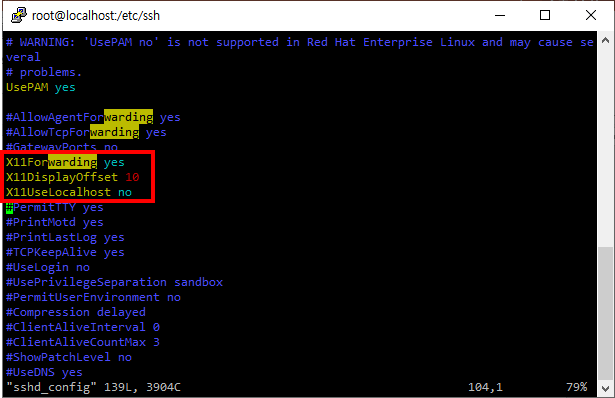
# 위에 화면처럼 수정
vi sshd_config

X11Forwarding yes
X11DisplayOffset 10
X11UseLocalhost no

# 수정 후
systemctl reload sshd
16. xclock 패키지 설치
# yum whatprovides xclock
Loaded plugins: fastestmirror, langpacks
Repodata is over 2 weeks old. Install yum-cron? Or run: yum makecache fast
Loading mirror speeds from cached hostfile
 * base: ftp.iij.ad.jp
 * extras: ftp-srv2.kddilabs.jp
 * updates: ftp-srv2.kddilabs.jp
xorg-x11-apps-7.7-7.el7.x86_64 : X.Org X11 applications
Repo        : base
Matched from:
Provides    : xclock


# yum install xorg-x11-apps
Loaded plugins: fastestmirror, langpacks
Loading mirror speeds from cached hostfile
 * base: ftp.iij.ad.jp
 * extras: ftp-srv2.kddilabs.jp
 * updates: ftp-srv2.kddilabs.jp
17. putty 접속 설정
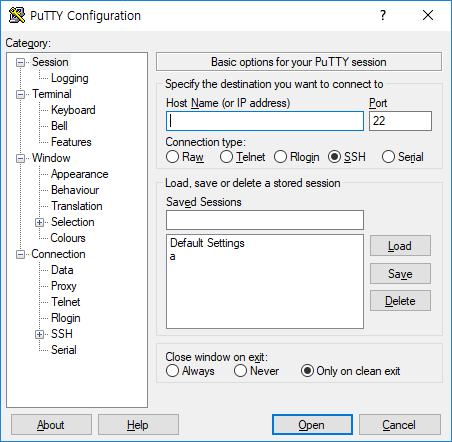
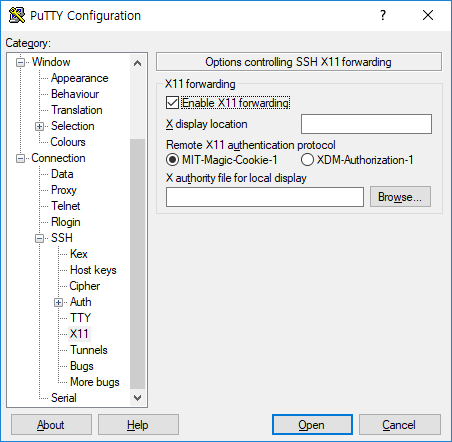
| 1. Host Name에 IP 입력 후 2. Connection-SSH-X11 클릭 3. Enable X11 fowarding 박스 체크 4. X display location -> localhost:0.0 입력 5. Open 클릭 |
18. Xclock 테스트
#오라클로 로그인 후

xclock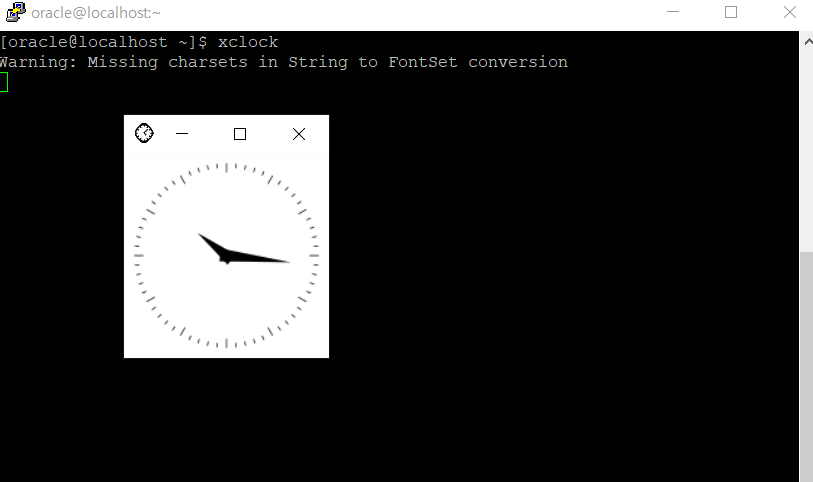
19. 오라클 설치
/stage/database/runInstaller설치방법 참조 - https://gonmossi.tistory.com/30
[ORACLE 12c] runlnstaller 스크립트
* 설치환경 * 보안 관련 자료를 My oracle support로부터 제공받을 수 있는 옵션을 제공한다. 현재 실습환경 구성이므로 이를 적용할 이유가 없으므로 박스 안 체크 해제 * Create and configue a database : 오
gonmossi.tistory.com
20. bash_profile 수정 및 적용
vi .bash_profile

TMPDIR=$TMP; export TMPDIR
ORACLE_BASE=/u01/app/oracle; export ORACLE_BASE
ORACLE_HOME=$ORACLE_BASE/product/12.1.0.2/db_1; export ORACLE_HOME
ORACLE_SID=DB12C; export ORACLE_SID
ORACLE_HOME_LISTENER=$ORACLE_HOME/bin/lsnrctl
PATH=$ORACLE_HOME/bin:$PATH; export PATH
LD_LIBRARY_PATH=$ORACLE_HOME/lib:/lib:/usr/lib:/usr/lib64; export LD_LIBRARY_PATH
CLASSPATH=$ORACLE_HOME/jlib:$ORACLE_HOME/rdbms/jlib; export CLASSPATH

#소스 적용
source ~/.bash_profile
21. 오라클 접속
sqlplus system@oracle
'Operating System > Linux' 카테고리의 다른 글
| Linux 7에 Oracle 11g 설치(2)- runlnstaller 스크립트 설치 (0) | 2023.03.15 |
|---|---|
| Linux 7에 Oracle 11g 설치(1)-기본세팅 (0) | 2023.03.15 |
| [Linux]Oracle Linux 7.9에 Mysql 8.0 설치 (0) | 2022.08.31 |
| [Linux] dns 문제 (ip설정 후 ping 연결되지만,웹사이트 접속 안될 때) (0) | 2022.03.30 |
| [Linux] sftp 사용하여 파일 전송 (0) | 2022.03.28 |